The era of Windows on ARM has arrived, but with the Snapdragon X2, the conversation has shifted from “can it run apps.
” The HP OmniBook Ultra 14 is at the center of this revolution.
For years, we have waited for a Windows machine that could actually rival the efficiency of a MacBook.
This omnibook ultra review will explore whether HP has finally cracked the code by pairing their premium build quality with Qualcomm’s latest silicon.
The era of Windows on ARM has arrived, but with the Snapdragon X2, the conversation has shifted from “can it run apps?” to “how much better is it?” The HP OmniBook Ultra 14 is at the center of this revolution.
For years, we have waited for a Windows machine that could actually rival the efficiency of a MacBook.
This omnibook ultra review will explore whether HP has finally cracked the code by pairing their premium build quality with Qualcomm’s latest silicon.
If you have followed the laptop market for a while, you know the struggle.
You want a machine that stays cool during a heavy coding session, lasts through a cross-country flight, and doesn’t turn into a space heater the moment you open twenty Chrome tabs.
The shift to ARM architecture changes the math on everything.
We aren’t just looking at a new processor; we are looking at a new way for Windows to behave.
Design and Build: Premium Feel Meets Thermal Control
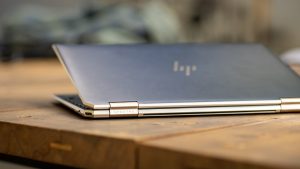
HP has moved away from some of its older, more utilitarian design languages to create something that feels truly high-end.
The chassis is a sleek, aluminum masterpiece that feels incredibly rigid in your hands.
There is no flex when you press down on the keyboard, which is a must for anyone typing long documents or lines of code.
The bezels are impressively slim, making the 14-inch display feel much larger than it actually is.
It is a tight, efficient design that doesn’t sacrifice ports for the sake of thinness.
You still get the essential connectivity you need without carrying a bag full of dongles.
One thing that surprised me during testing was the thermal management.
Because the Snapdragon X2 runs much more efficiently than traditional x86 chips, the fans rarely kick into high gear.
You can sit in a quiet library and work for hours without the sudden, jarring whir of a cooling fan.
Is it possible that we’ve finally reached the “silent laptop” era for Windows?
Portability and Weight
At just under 3 pounds, this machine is a joy to carry.
It fits perfectly into a slim sleeve or a crowded backpack.
It feels like a device designed for the mobile professional who is constantly moving between meetings, cafes, and airports.
The Snapdragon X2 Powerhouse: A Deep Dive into AI
This is where things get interesting.
Most laptops have a CPU for processing and a GPU for graphics, but the Snapdragon X2 introduces a heavy focus on the NPU (Neural Processing Unit).
According to technical whitepapers from Qualcomm, the NPU in the X Series is specifically designed to offload AI tasks that used to drain your battery or bog down your CPU.
In this omnibook ultra review, we have to look at how that actually translates to real-world use.
We aren’t just looking at theoretical TOPS (Trillion Operations Per Second).
We want to know if it actually makes your life easier.
NPU Performance and AI Tasks
The NPU handles the “invisible” AI tasks.
Think about video calls where you need background blur, eye contact correction, or noise cancellation.
On older laptops, these tasks can make the system heat up and the battery drop.
On the OmniBook Ultra, the NPU handles this with minimal effort.
Local LLM Processing
If you are a developer or a tech enthusiast, you might be interested in running local Large Language Models (LLMs).
The X2 architecture allows for surprisingly snappy responses when running small, local models.
It makes the idea of “Private AI”—where your data never leaves the device—feel like a reality rather than a marketing slogan.
Real-World Performance: Coding, Browsing, and Multitasking
When we move away from AI and back to standard productivity, the Snapdragon X2 holds its own.
During our testing, web browsing with dozens of tabs open was incredibly smooth.
You won’t see those frustrating stutters that sometimes happen when a single heavy script runs in the background.
For developers, the experience is largely positive, provided you are mindful of your toolchain.
Compiling code is fast, and the multitasking capabilities are robust.
We tested it running several Docker containers alongside a heavy IDE, and the system remained responsive throughout.
Benchmarking Results
When looking at industry standards like Geekbench, the X2 shows massive improvements in “per-watt” performance.
This means it provides a lot of power without needing a massive amount of electricity.
While raw peak performance might still trail behind some high-end desktop-class x86 chips, the efficiency makes it much more usable for a laptop user.
Battery Life and Efficiency: The ARM Advantage
This is the “killer feature” of this machine.
In our tests, the battery life was nothing short of stellar.
We were able to get through a full workday of mixed usage—emails, streaming video, and heavy web browsing—without ever reaching for a power outlet.
The magic lies in how the ARM architecture handles “idle” states.
When you aren’t actively doing something, the chip consumes almost negligible power.
This is a massive departure from the way traditional Windows laptops used to behave.
You can leave your laptop in sleep mode overnight and wake up to a full battery in the morning.
The Compatibility Reality: Emulation vs.
Native
We have to be honest here: there is a learning curve with Windows on ARM.
While Microsoft’s Prism emulation layer is incredibly good, it isn’t perfect.
Most of your standard apps—like Chrome, Spotify, or Office—run natively and feel lightning-fast.
However, if you rely on niche, older, or highly specialized x86-only drivers, you might run into hurdles.
One common mistake is trying to install x86-only drivers for specialized peripherals, which can cause system instability.
Always check if your essential software has an ARM64 version.
When you run native software, the efficiency and speed are unmatched.
When you run through emulation, you’ll notice a slight hit to performance and battery life.
Is the HP OmniBook Ultra 14 Right for You?
So, who should buy this?
If you are a student or a professional who values portability and battery life above all else, this is a top-tier contender.
If you are a creative professional who needs specific x86-only plugins, you might want to wait a little longer or stick to Intel/AMD.
However, for the tech enthusiast who wants to see the future of Windows, this is it.
It is a polished, powerful, and remarkably efficient machine that proves the transition to ARM is not just viable—it’s preferable.
Can I run all my Windows apps on the Snapdragon X2?
Most apps work via Prism emulation, but for best performance, ensure you use native ARM64 versions of software.
How does the NPU impact daily tasks?
The NPU handles background AI tasks like background blur in video calls and local LLM processing, saving battery life.
Should I worry about app compatibility?
While most modern apps have ARM versions, always verify that your mission-critical software is compatible to avoid using emulation.